

To prepare a song idea to leave your phone, choose the small set of material that will help you continue the writing: the lyric fragment, a voice recording if its sound matters, and only the context that makes either one clearer. Then review the destination and check receipt as a separate step. Preparing a handoff is not the same as knowing the other person or app has received and opened it.
That distinction keeps a passing idea light. You can catch it now, decide what it needs later, and avoid sending every note, take and possibility simply because they happen to be nearby.
Capture first; add context when it helps
A line or melody can be worth keeping before you know its title, key or place in a finished song. Kordra Capture is an iPhone app for saving text and voice ideas locally, with optional songwriting context. You can add details such as section, mood, chords, key or tempo when they help you find or understand the idea later; they need not become a form to complete before you can save a thought.
If several fragments belong together, a Song Seed can keep them in a lightweight ordered group. That gives you a way to gather a lyric, a voice take and a note without pretending they are already a finished arrangement. Capture also works on its own: a next step to Studio is optional, not a requirement for using the app.
Decide what should travel
Before preparing anything to send, ask one practical question: what would I need in front of me to make the next useful writing decision?
For a lyric question, the text may be enough. If the melody, rhythm or phrasing carries the idea, include the voice recording too. Add context only where it prevents a likely misunderstanding: perhaps “rough chorus melody” or “tempo is only a guess”. A precise number is less useful than an honest note when you have not measured it.
The same test helps remove noise. An old alternative line, an unrelated voice memo or a long list of tags may not help the next session. Selecting fewer things is not a judgement on the discarded ideas; they remain in Capture while you prepare a separate handoff of the material you chose.
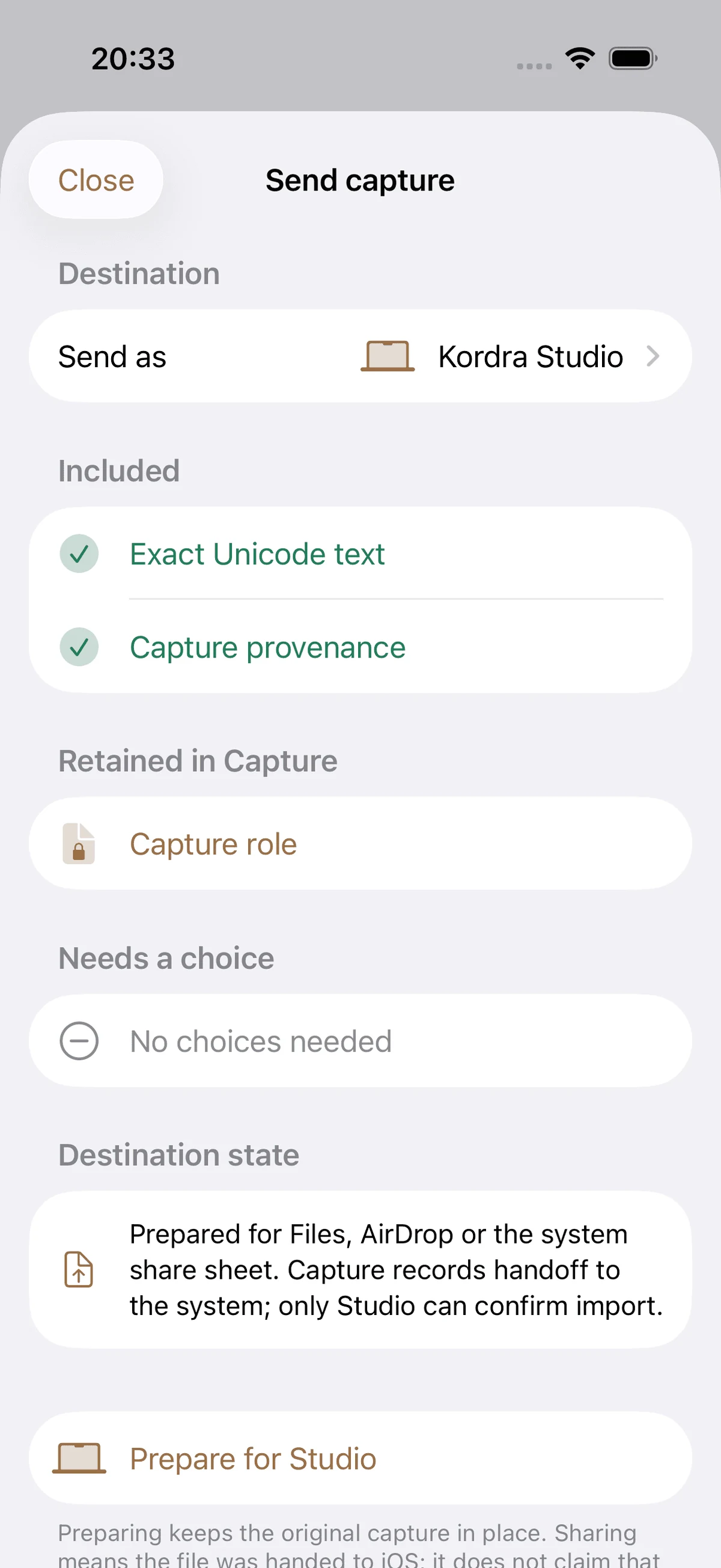
Review the handoff before you send it
Capture’s handoff review separates the material included in the outgoing copy from the original that remains in Capture. It also shows the destination and whether a choice is still needed. Read those parts in order: confirm the selected text or audio, notice what stays behind, then check whether the destination is the one you intend.
For a concrete example, imagine a songwriter has a two-line verse fragment and a voice note that preserves a descending melody. They want to continue it at the next writing session, but the tempo is unsettled. This is an illustrative example, not a customer result. They might send the two lines, include the voice note, and label the tempo “approximate” rather than guessing a number. A separate alternative chorus can stay on the phone until it becomes relevant.
Capture prepares the selected material and keeps the original on the iPhone. You choose whether to use Files, AirDrop or another iOS destination. If the receiver needs a particular filename or format, check that requirement before sending instead of assuming the default will suit every workflow.
Treat receipt as its own check
Once you have handed files to iOS, verify the next step that matters. If you saved to Files, find and open the saved item. If you sent it to another person, ask them to confirm that it arrived and that they can open the useful part. If the intended destination is Kordra Studio, confirm inside Studio that the idea is present before relying on it for the session.
The share sheet closing or an AirDrop completing only tells you about that handoff step; it does not, by itself, prove successful import into another app. Capture’s own handoff guidance makes the distinction visible: it records that material was prepared for a destination, while only Studio can confirm an import into Studio. When receipt matters, keep enough time to check it and a fallback copy of the source idea on your phone.
A small checklist for the next session
Before leaving the idea on your phone, check four things:
Can the recipient identify which song or fragment this is?
Is the selected audio needed to hear the melody, rhythm or delivery?
Have you labelled uncertain context honestly instead of inventing precision?
Have you checked the destination itself after sending?
The useful handoff is not the largest one. It is the smallest set of material that lets you resume the idea without having to reconstruct what you meant. For a wider producer-session pack, see what to send a producer before a songwriting session. To see how the current iPhone capture workflow handles text, voice and explicit handoff, explore Kordra Capture.
Practical takeaway
Save the fragment first. Before sending it, choose the lyric, audio and context that serve the next decision; then check that the receiving destination has the material you need. Keep the original on your phone until you know the handoff is useful.